Keyword management
Organize search terms, intent and content opportunities.
FROM FIRST IDEA TO PUBLISHED WEBSITE
Good content deserves a home.
Plan your content. Build your website. Keep publishing.
Your AI writer, website builder and SEO workflow, together.
ONE CONNECTED WORKFLOW
From a keyword to a live page, each step has a place.
Collect keywords and organize related topics into clusters.
Create articles, refine your voice and choose your website design.
Publish yourself or use campaigns and a scheduled queue.
Review website analytics, leads and AI search visibility.
MEET YOUR WORKSPACE
One place for the work that usually ends up spread across five different tools.
Write, refine and format articles in one editor. Work with the AI assistant, check SEO and quality, manage metadata, and publish when you're ready.
A WEBSITE THAT FEELS LIKE YOU
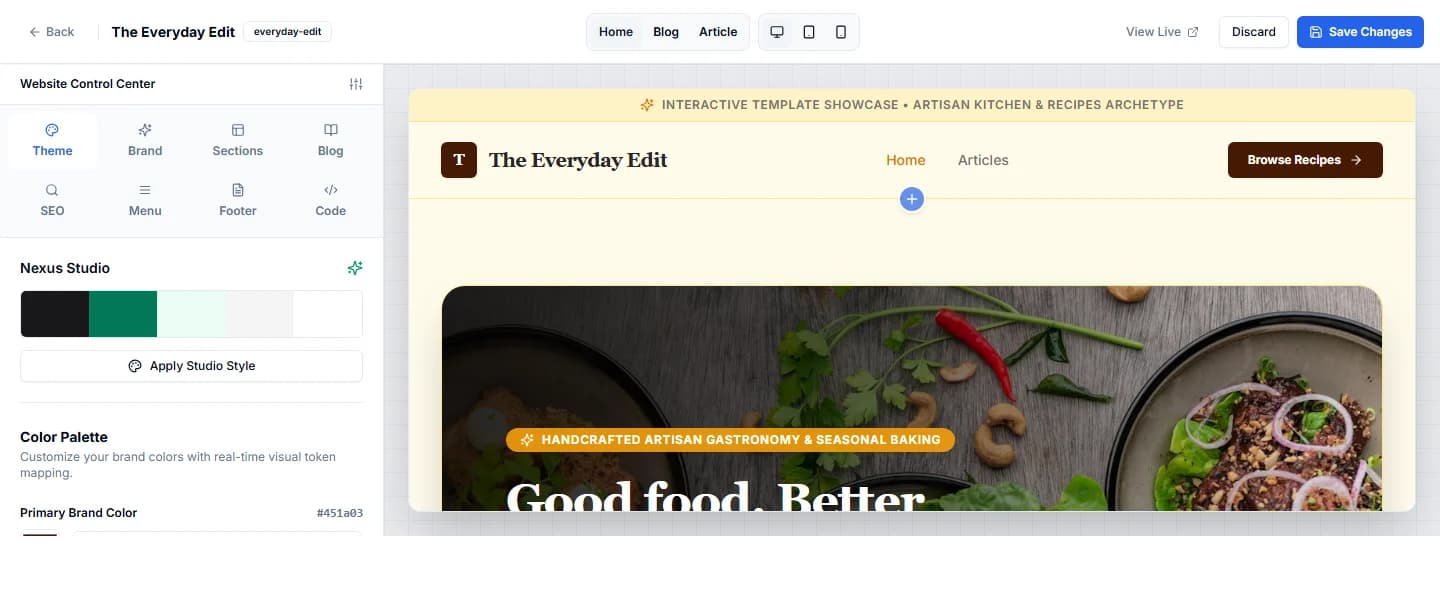
Start from a template, then make room for your own ideas. Change your colors, edit your sections, add pages and connect your domain.
BEYOND THE PUBLISH BUTTON
Bring AI visibility, website activity and captured leads back into your workflow. Use what you learn to decide what to create next.
Explore AI visibilityTrack queries and review results from supported AI search providers.
Review activity across the websites you manage.
Keep inquiries and newsletter signups connected to your site.
THE WHOLE TOOLKIT
The big launches and the small edits in between.
Organize search terms, intent and content opportunities.
Group related ideas into a connected content plan.
Generate drafts, refine sections and manage revisions.
Add featured images, structured sections and richer articles.
Connect content feeds and set a publishing cadence.
Schedule, reorder, pause and track upcoming articles.
Customize your homepage, blog, pages and navigation.
Run a native website on your own domain, on supported plans.
Track selected queries and review AI search visibility.
Review website activity from your control center.
Capture inquiries and newsletter signups on your website.
Manage websites, members, permissions and usage together.
KEEP THE TOOLS YOU ALREADY LIKE
Build on Collabraz or connect your existing publishing platform.
Connection methods and availability vary by platform and plan.
Connect your workflowDEVELOPER PLATFORM & AI CONNECTORS
Run autonomous SEO from Claude, Cursor, and ChatGPT, or build programmatic publishing workflows with our REST API.
Connect your AI assistant directly to Collabraz. Schedule blog articles, inspect website status, and find high-intent keywords without switching tabs.
collabraz_generate_article & collabraz_audit_visibilityProgrammatic control over autonomous content creation, website deployment, multilingual keyword generation, and multi-LLM citation tracking.
ROOM TO GROW
Choose the workspace that fits your websites and content.
No credit card required
Start free trialBilled monthly
Get startedBilled monthly
Get startedBilled monthly
Get startedPrices in USD. AI credits and usage allowances apply. Review your plan details before subscribing.
A FEW GOOD QUESTIONS
Both. Collabraz combines AI content creation, campaign scheduling and publishing with native websites, editable templates, pages and custom domains. You can also publish to a connected CMS.
Yes. Connect a supported publishing platform in Integrations. You can use Collabraz for your content workflow without moving your existing site. Available connections depend on your plan and the destination's requirements.
Yes. You can work with drafts in the article editor, review content and publish manually. Campaign and queue settings also support automated publishing when you choose to enable it.
Yes. The Website Control Center includes branding, theme, section, blog, SEO, navigation and footer settings. You can add and arrange supported sections and preview different device sizes.
No. It helps you monitor supported AI search queries and review visibility results. Rankings, indexing and citations are determined by the search providers and aren't guaranteed.
Native hosting and custom-domain access depend on your plan. Website export is also available, so you can download your content and site data. AI credits and publishing allowances are shown in your workspace.